
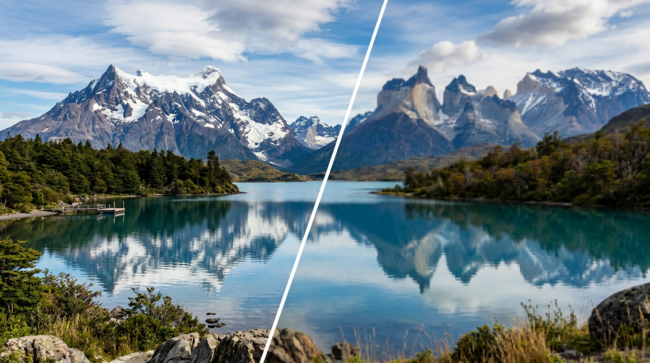
Image resolution is one of those details that’s easy to overlook—until it’s too late. Whether you’re designing for print or digital, the quality of your source images has a direct impact on how professional your final output looks. Starting with poor-quality files almost always leads to disappointing results, no matter how polished the rest of the design may be.
What is image resolution?
At its simplest, resolution refers to the amount of detail an image holds. In digital terms, this is measured in pixels (like 1920×1080), while in print it’s often expressed as DPI (dots per inch). The higher the resolution, the more detail is captured—and the sharper the image will appear.
Low-resolution images, on the other hand, contain fewer pixels. When stretched or printed larger than intended, they quickly become blurry or pixelated.
Why resolution matters in print
Print is far less forgiving than screens. Once something is printed, you can’t “hide” poor quality—it’s locked in.
For brochure printing, images are typically viewed up close, meaning detail really matters. Standard print quality is around 300 DPI at the final size. If you place a low-resolution image into your layout and scale it up, it may look acceptable on screen, but it will appear soft and unprofessional when printed.
With large format printing—like banners, posters, or exhibition graphics—the rules are slightly different but no less important. These designs are often viewed from a distance, so they can get away with a lower DPI (sometimes 100–150 DPI at full size). However, the image still needs to have enough resolution relative to its final dimensions. A small, low-quality image scaled up to several metres wide will look visibly pixelated, even from afar.
Why resolution matters in digital
While screens don’t require DPI in the same way print does, resolution still plays a crucial role in digital design.
For example, images used in digital brochures or PDFs need to strike a balance between quality and file size. Too low, and they look blurry or compressed. Too high, and the file becomes slow to load or difficult to share.
On websites and social media, high-resolution displays (like Retina screens) have raised expectations. An image that once looked sharp can now appear soft if it doesn’t have enough pixel density. Using properly sized, high-quality images ensures your content looks crisp across all devices.
Large format vs brochure vs digital: different needs, same principle
Each medium has slightly different technical requirements:
- Brochures (print): High resolution (300 DPI), viewed up close
- Large format (print): Lower DPI acceptable, but large overall dimensions required
- Digital use: Pixel-based, optimised for screens and performance
Despite these differences, the core principle remains the same: the quality of the output is limited by the quality of the input.
The danger of starting with poor files
One of the most common mistakes is trying to “fix” a low-resolution image by scaling it up or increasing its DPI in software. Unfortunately, this doesn’t add real detail—it simply spreads existing pixels over a larger area or artificially inflates the file.
The result? Blurry images, visible pixelation, and a loss of professionalism that reflects poorly on your brand or project.
Final thoughts
Good design can’t compensate for poor image quality. Whether you’re producing a high-end brochure, a large exhibition graphic, or a digital publication, starting with high-resolution images ensures your work looks as sharp and polished as intended.
When it comes to resolution, it’s simple: get it right at the beginning, and everything else falls into place.